How to Create a Digital Christmas Card in Minutes
A digital Christmas card is a fast, fun, and eco-friendly way to spread holiday cheer. While traditional methods exist, the fastest and most unique way to create a truly custom card today is using modern Artificial Intelligence.
The Best (and Fastest) Way: Instant AI-Generated Cards
This method is ideal for anyone who has struggled to get the perfect family photo, wants a truly unique artistic style, or simply doesn't have the time to learn graphic design software.
The biggest challenge in making a great card is getting a high-quality, cohesive photo of everyone involved. Our AI web app, Fun HolidayCards, solves this by letting you upload multiple separate photos and generating a single, stunning image where everyone looks like they belong together.
The "Before" Photos



3 casual photos uploaded individually.
The "After" Card
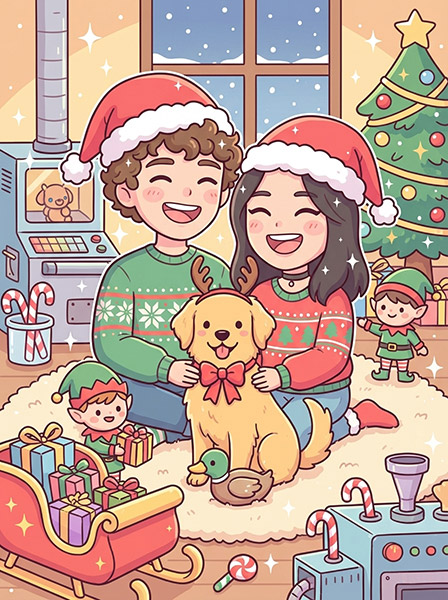
One seamless, unique, printable card!
Kawaii style christmas card
Step-by-Step with Fun HolidayCards
- 1 Gather Your Source Photos (The 5-Minute Setup)
You don't need a single perfect photo. Just find individual, good-quality photos of each person you want to include in the card.
Tip: Good lighting and clear facial features are all you need. The AI handles the backgrounds and outfits. - 2 Enter a message to add to the card.
Think about who you are going to send the card to
- 3 Upload, Choose a theme and a style
Choose a location for your card, either a country, a city or a magical location
Choose one of the art styles for the card
- 4 Generate, Review, and Share
The AI will take a minute to create a beautiful card for you.
Why This Method Wins: No stress, total personalization, and a card everyone will talk about.
▶️ Start Generating Your Card Now!Traditional Methods: Creating a Digital Card the Old-School Way
If you prefer pre-made templates or have extensive design skills, the following tools are common alternatives.
A. Template-Based Design (e.g., Canva, Adobe Express)
This is a great option if you have one single, perfect photo and want a clean, simple design.
The Drawback: Customization is limited to the template's structure. If you need to combine elements from different photos, this method is frustrating.
B. Professional Design Software (e.g., Photoshop, GIMP)
This method is for graphic designers who need pixel-perfect control over every element.
The Drawback: This is extremely time-consuming and requires significant technical skill. Merging multiple photos seamlessly can take hours, even for a professional.
Essential Tips for the Perfect Digital Christmas Card
- Mind the Resolution: Always download your final image in the highest resolution available. This ensures it looks crisp on high-resolution screens.
- Test the Send: Before mass-sending, email or text the card to yourself or a friend. Check that the image displays correctly on both Android and iPhone devices.
- Personalize the Message: If your card is funny, use the email or text body to set up the joke! "We tried to take a nice family photo this year... and the AI made this instead. Happy Holidays!"
The Verdict: Ditch the Stress, Embrace the Fun
If your goal is to create the most unique, personal, and fun card your friends and family will receive this year—without spending a weekend trying to master Photoshop—the AI-powered approach is the clear winner.
Click Here to Get Your Unique AI Card Today!